

This document explains how to configure the AiStrike integration for CrowdStrike.◼︎
AiStrike integrates directly with CrowdStrike APIs to enrich investigations, automate responses, and provide contextual security insights. This guide will walk you through the setup steps.
Prerequisites
Before starting, ensure you have the following:
Administrator access to CrowdStrike Falcon Console
-
Required to create API clients and assign permissions.
API Client creation permissions in CrowdStrike
Ability to generate:
-
Client ID
-
Client Secret
Integration Overview
To enable this integration, you will:
-
Create API credentials in the CrowdStrike dashboard
-
Install the credentials into your AiStrike tenant
-
Configure integration parameters (e.g., client ID, URL, client secret etc.)
Step 1: Create API Credentials in CrowdStrike
-
Log in to your CrowdStrike dashboard:
https://falcon.us-#.crowdstrike.com/— Replace # with your region (us-1, us-2, eu-1, or us-gov-1) -
From the main menu, go to: Support and Resources > API Clients and Keys
-
Click API Clients and Keys → On the right-hand side, select Create API Client
-
On the Create API Client page:
-
Client Name: AiStrike
-
Description: AiStrike Integration Key
-
-
Under Scopes, enable the following:
NOTE: To onboard CrowdStrike with AiStrike, the API key must be configured with the following scopes:
|
Permission Scope |
Read |
Write (Response) |
Details |
|---|---|---|---|
|
Alerts |
✓ |
|
View detection information |
|
Detections |
✓ |
|
View information about a detection, such as its behavior, severity, associated host, timestamps, and more. |
|
Hosts |
✓ |
|
Search for hosts and get host details |
|
NGSIEM |
✓ |
✓ (Create Search) Required to run search queries |
Run Next-Gen SIEM queries and get query job status and results. |
|
Incidents |
✓ |
|
Retrieve data about incidents |
|
Quarantined Files |
✓ |
|
Get info about quarantined files and quarantine actions. |
|
On-demand scans (ODS) |
✓ |
|
View data about upcoming or recent scans, and view scan results. |
|
Real Time Response |
✓ |
|
RTR commands that get information from a host, equivalent to the RTR Read Only Analyst role |
|
Event Streams |
✓ |
|
Find and connect to event streams. |
|
Threatgraph |
✓ |
|
Get metadata and see relationships between entities such as indicators, process executions, image file loads, and IP addresses. |
|
Identity Protection Entities |
✓ |
|
Search entity data |
|
Identity Protection Timeline |
✓ |
|
Search timeline data |
|
Other features |
✓ |
|
Read/View data from other modules like IOC, Intelligence Monitoring, and other available modules as per the customer license |
-
Click Create
-
Copy the Client ID and Client Secret. Share the details securely with the AiStrike team. (password manager link, encrypted channel, or email, AiStrike UI Configuration)
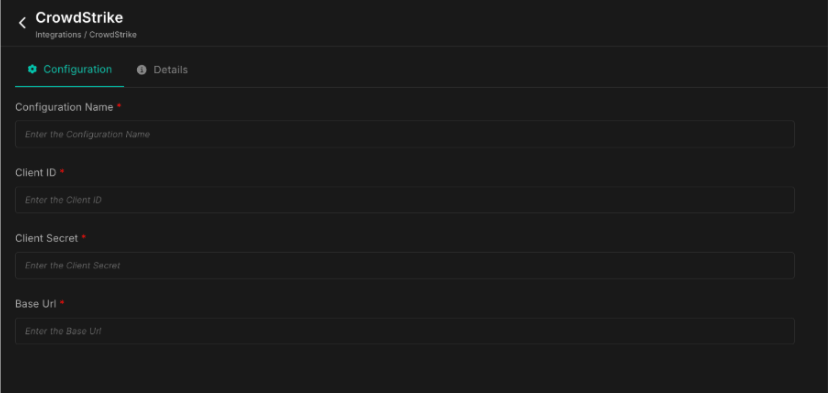
Step 2: Configure the AiStrike Integration
This integration allows AiStrike to access CrowdStrike data for investigation analysis, enrichment, and AI-driven workflows.
You'll need:
|
AiStrike Field |
Value |
|---|---|
|
Configuration Name |
Example: Crowdstrike-API-Connector |
|
Client ID |
Client ID from CrowdStrike |
|
Client Secret |
Client Secret from CrowdStrike |
|
Base URL |
Example: |
To configure the CrowdStrike integration:
-
Log in to your AiStrike tenant:
https://mycompany.AiStrike.com -
In the menu pane, navigate to: Integrations > Crowdstrike
-
Select CrowdStrike and enter your Client ID, Client Secret, and other details
-
Save the integration
API base URL mapping:
-
us-1 → api.crowdstrike.com
-
us-2 → api.us-2.crowdstrike.com
-
eu-1 → api.eu-1.crowdstrike.com
-
us-gov-1 → api.laggar.gcw.crowdstrike.com
Optional configuration (remediation)
If AiStrike will perform automated response in CrowdStrike (for example: host isolation, network containment, on-demand scans, or file quarantine beyond read-only use), enable the additional Write / Response scopes.
|
Scope |
Read |
Write |
Details |
|---|---|---|---|
|
Hosts |
✓ |
✓ |
Search for hosts and get host details |
|
On-demand scans (ODS) |
✓ |
✓ |
View data about upcoming or recent scans, and view scan results. |
|
Quarantined Files |
✓ |
✓ |
Get info about quarantined files and quarantine actions. |
|
Real Time Response |
✓ |
✓ |
RTR commands that get information from a host, equivalent to the RTR Read Only Analyst role |
|
Incidents |
✓ |
✓ |
Retrieve data about incidents |
Nice to have (optional)
Read-only Falcon console user (For validation of alerts and data being ingested)
AiStrike analysts to have read-only visibility in the Falcon UI during investigations, you can create a separate console user with a Viewer (or equivalent read-only) role and provision access through your standard privileged-access process. This is not required for the API integration to function.