

Overview
This guide provides step-by-step instructions on creating an Azure App Registration for MS Sentinel. It also includes the necessary permissions required for the user performing this setup. This guide will help you with the following:◼︎
-
Create the Azure App Registration.
-
Create a client secret for the app.
-
Grant the registered Azure App Registration access to the Azure subscription for MS Sentinel.
Prerequisites
Before starting, ensure you have the following:
-
An Azure subscription with Microsoft Sentinel enabled
-
Global Administrator or Application Administrator role in Microsoft Entra ID (required to create the App Registration where the tenant restricts app registrations)
-
Subscription Owner or User Access Administrator role on the Azure subscription where Sentinel is configured (required to assign IAM roles)
NOTE: If your Sentinel deployment spans across multiple Azure subscriptions, assign roles at the Management Group level instead of repeating the subscription-level steps. Follow the Management Group section via Step 4.
Step 1: Create the Azure App Registration
-
Sign in to the Azure portal as an administrator.
-
Select Microsoft Entra ID.
-
Go to App registrations > New registration.
-
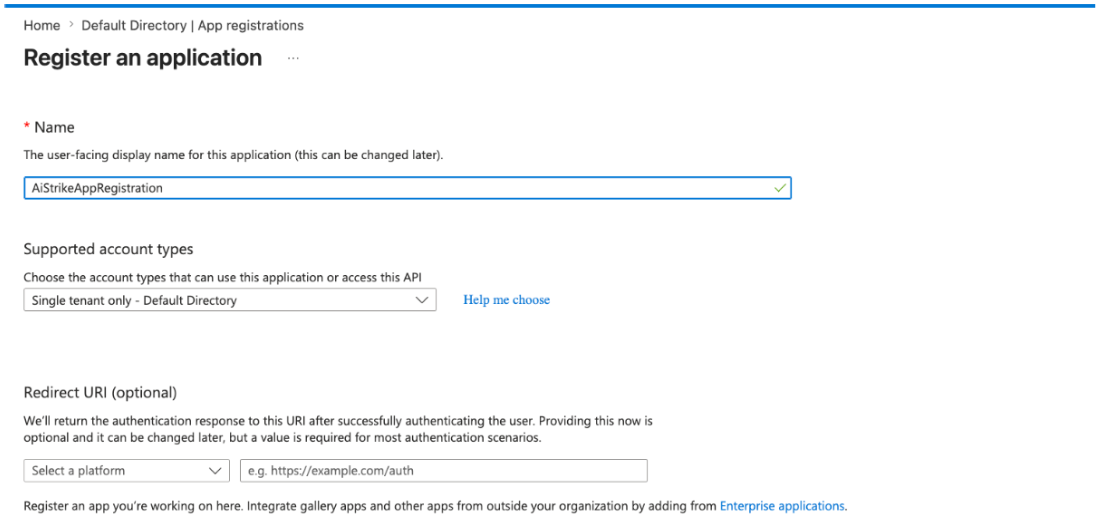
Enter the name of the app (
AiStrikeAppRegistration). -
Select the applicable supported account type. Choose: Single tenant only
-
Leave the Redirect URI blank.
-
Click Register.
-
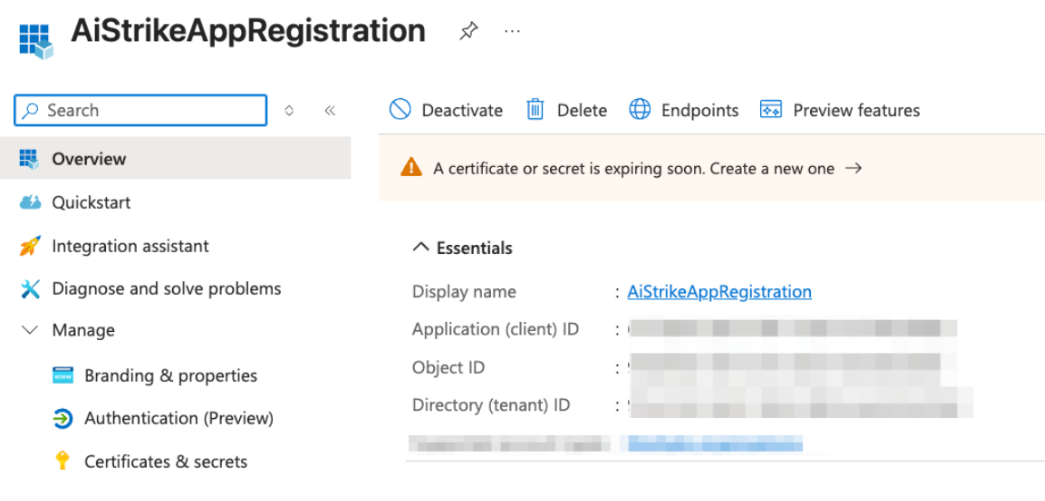
Save the Application (client) ID and Directory (tenant) ID values to use them later when configuring the integration parameters. This information is available in the Overview of App.
Step 2: Create client secret
-
Navigate to Certificates and secrets > New client secret.
-
Provide a description for a client secret and set its expiration deadline as per your contract period (12 months or longer).
-
Click Add.
-
Save the value of the client secret (not the secret ID) to use it as the Client Secret parameter value when configuring the integration. The client secret value is only displayed once.
Step 3: Give app access to the Azure subscription
-
Go to the Microsoft subscription where Sentinel is configured.
-
Click Access control (IAM).
-
In the Add a role assignment section, click Add.
-
Configure the following parameters:
-
Role = Microsoft Sentinel Reader & Log Analytics Reader.
-
Assign access to = User, group, or service principal.
-
Click Select members.
-
NOTE: Sentinel Reader = incidents/alerts; Log Analytics Reader = KQL queries
-
In the Select section, provide a search condition to find your app and add a role assignment for your app (
AiStrikeAppRegistration). -
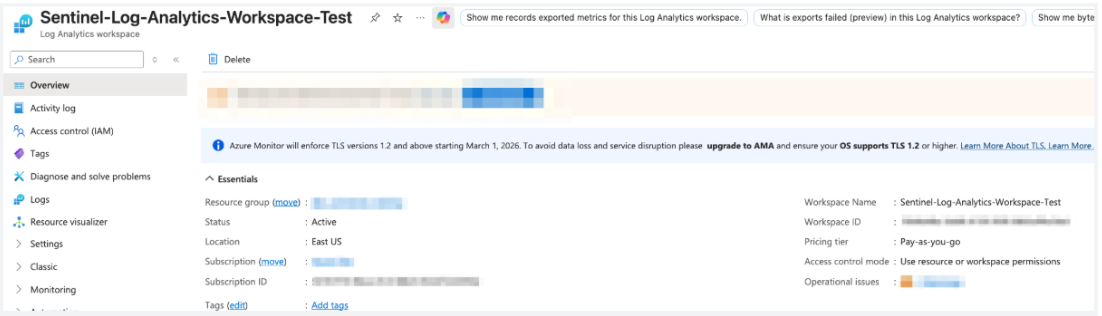
To get the Sentinel log analytics workspaces details. Search for Subscriptions, then select the one hosting Sentinel: From the workspace's Overview blade, copy the Resource group and Name.
-
Resource Group
-
Workspace Name
-
Step 4: (Optional) Assigning Roles at the Management Group Level
Using Azure Portal:
-
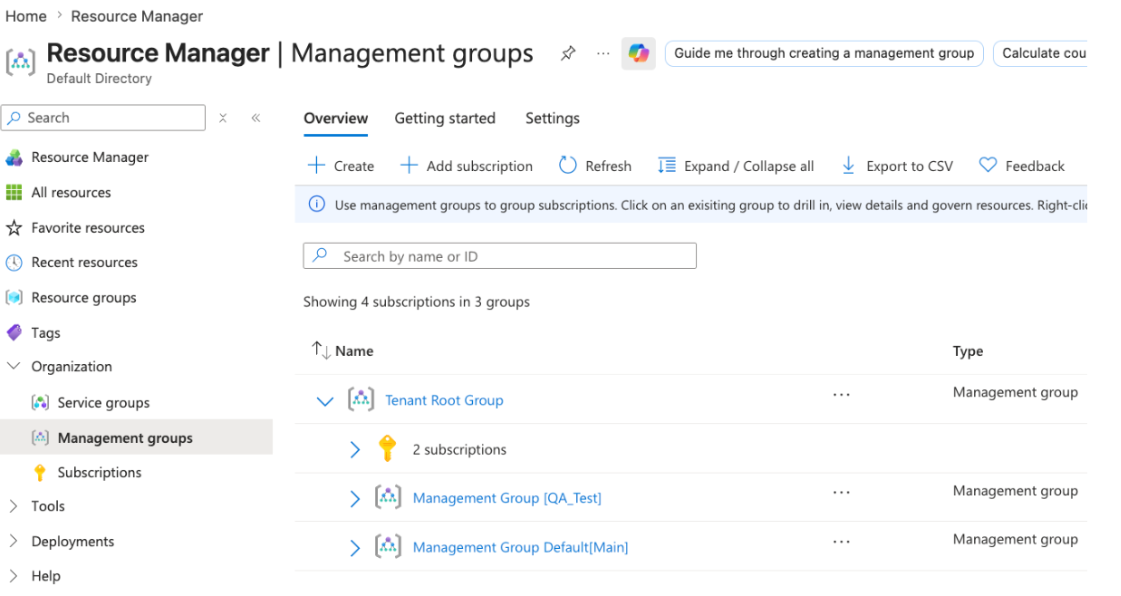
Go to Management Groups.
-
Click on the management group that contains the subscriptions you want to provide access to (e.g., 'Management Group Default[Main]'). To grant access across all subscriptions with Sentinel, select the correct group.
-
Click "Access Control (IAM)" on the left menu.
-
Click Add role assignment.
-
Role = Microsoft Sentinel Reader & Log Analytics Reader.
-
NOTE: Sentinel Reader = incidents/alerts; Log Analytics Reader = KQL queries
-
Under Members, select the app registration.
-
Search for the app registration name and select it.
-
Click Review and assign.
-
Validate the assignment under the Role assignments tab.
NOTE: Management Group-level assignments inherit down to all child subscriptions.
Parameters required to configure the AiStrike connector (Microsoft Sentinel)
|
Field |
Description / Placeholder |
|---|---|
|
Name |
Enter the Name, i.e., Customer-Sentinel-Prod |
|
Description |
Enter the Description |
|
Entra Client ID |
Enter the Entra Client ID (Step 1, point 8) |
|
Entra Client Secret |
Enter the Entra Client Secret (Step 2, point 4) |
|
Entra Tenant ID |
Enter the Entra Tenant ID (Step 1, point 8) |
|
Resource Group |
Enter the Resource Group (Step 3, point 6) |
|
Workspace Name |
Enter the Workspace Name (Step 3, point 6) |