

The AiStrike platform integrates with Stellar Cyber, an AI-powered SecOps platform offering security solutions such as SIEM, Network Detection & Response (NDR), Identity Threat Detection & Response (ITDR), and User Behavior Entity Analytics (UEBA). AiStrike can perform analysis on cases and alerts from the Stellar Cyber Connect API, and/or use Stellar Cyber data as part of investigation analysis.
Integration Overview
To enable this integration you will perform the following actions:
-
Create an API token
-
Install the credentials into your AiStrike tenant
-
Select integration parameters, such as which alert types to sync
Create an API Key
Stellar Cyber requires an API key to enable. To create an API key with the necessary permissions, the user must have Root scope and Super Admin privileges.
If you already have a user with Root scope and Super Admin privileges
-
As a user with the Edit User privilege, log into your Stellar Cyber instance.
-
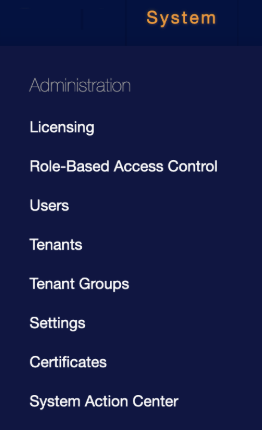
In the menu bar, click System.

-
Navigate to Administration > Users.
-
Under the Users tab, locate a user with Root scope and Super Admin privileges.
-
Copy the email address for use later in the AiStrike UI, where it is called User Email Address.

-
Under Actions, click the Edit button.

-
In the API Access section, click Generate New Token.
-
Copy the token shown for use later in the AiStrike UI, where it is called Access Token.

If you do not already have a user with those privileges
-
As a user with the Add User privilege, log into your Stellar Cyber instance.
-
Navigate to System > Administration > Users.
-
Under the Users tab, click + Create.

-
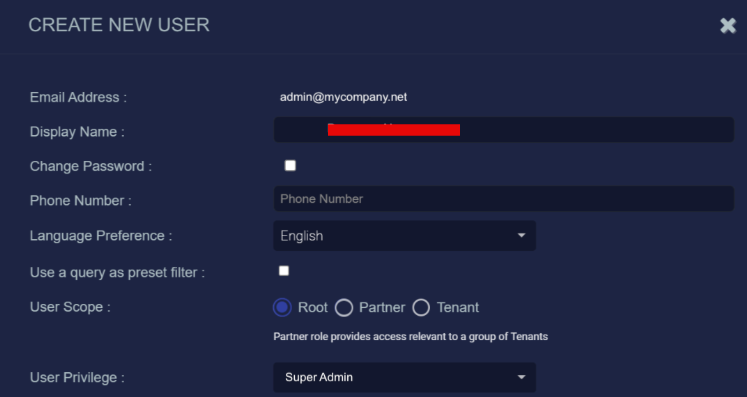
Input an email address for the user. Copy the value for use later in the AiStrike UI, where it is called User Email Address.
-
Stellar Cyber requires a unique email address for all its users. We recommend creating a dedicated email address for this user, rather than using an existing company email.
-
-
Name the user something memorable, such as AiStrike.
-
Create a password for the user.
-
Next to User Scope, click Root.
-
Next to User Privilege, select Super Admin.
-
In the API Access section, click Generate New Token.
-
Copy the token shown for use later in the AiStrike UI, where it is called API Key.
-
If you do not copy the token when the user is created, you will need to generate a new token.
-
